
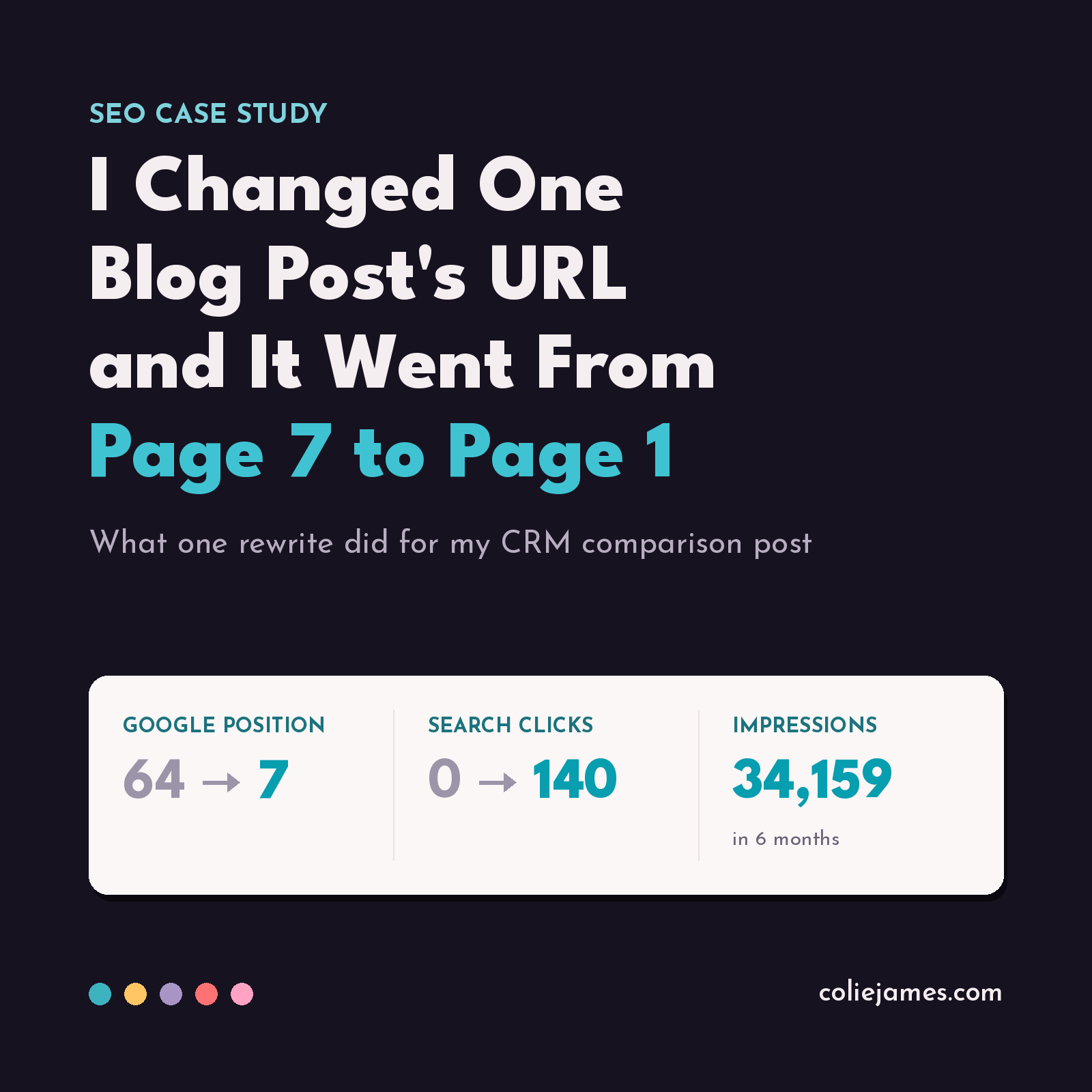




For almost a year, my CRM post sat on page seven of Google, and it got zero clicks. Not ONE 😳
So in May I moved it to a new URL and rewrote it for what photographers actually search, and guess what? The very next day Google was showing it around position 8.
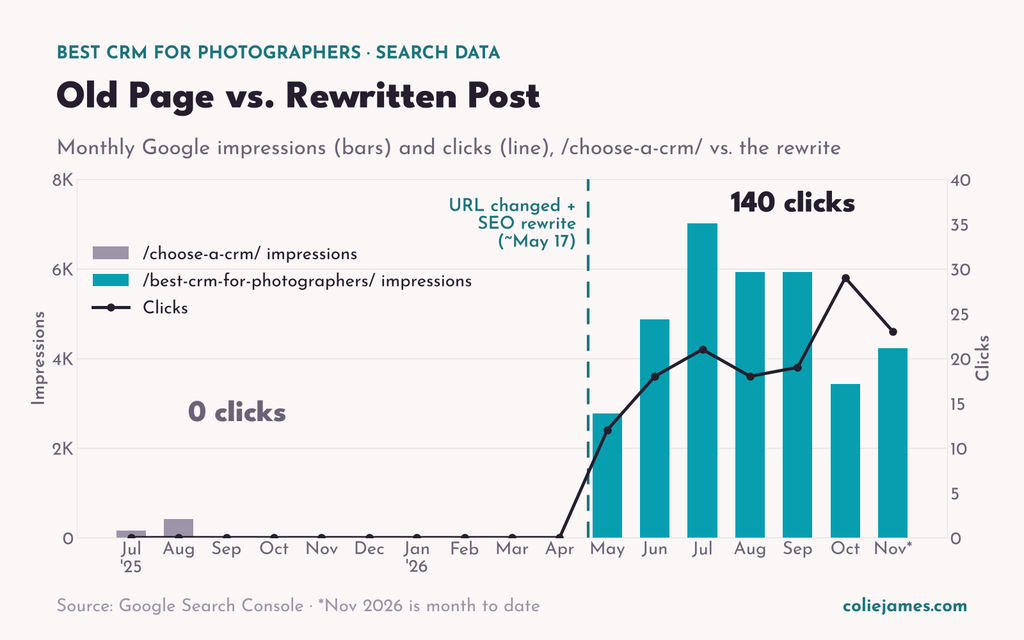
Should you change a blog post’s URL for SEO? If the post isn’t ranking and the URL doesn’t match what people search, it can be worth it. Set up a 301 redirect from the old URL, then rewrite the title, meta description and headings to match the new search. That’s what I did with my CRM post. It went from zero clicks to 140 clicks from Google since May.
But first, hi, I’m Colie. I’ve spent 6+ years helping 300+ photographers set up their CRMs, which is exactly why this post mattered so much to me. It’s the one I send photographers to when they’re deciding which CRM to buy. I’m not an SEO strategist. I just had a post that should’ve been working and wasn’t.
This post zooms in on one chapter of my bigger SEO overhaul.
Want the whole story, mistakes included? Read What I Learned Redoing My SEO (And Why I Stopped Writing New Posts First).
The Post Nobody Was Finding
The post lived at coliejames.com/choose-a-crm/. The title was How to Choose a CRM for Your Small Business.
The advice inside was solid. It walked through pricing, starter plans, design, workflows, integrations and schedulers, and it ended with my recommendation: Dubsado or HoneyBook.
But look at that title. I wrote it back when I was trying to expand my audience, so it said “small business,” even though the post itself was written for photographers like almost everything I publish. And “how to choose” is a different search than the one photographers type when they’re ready to pick a CRM.
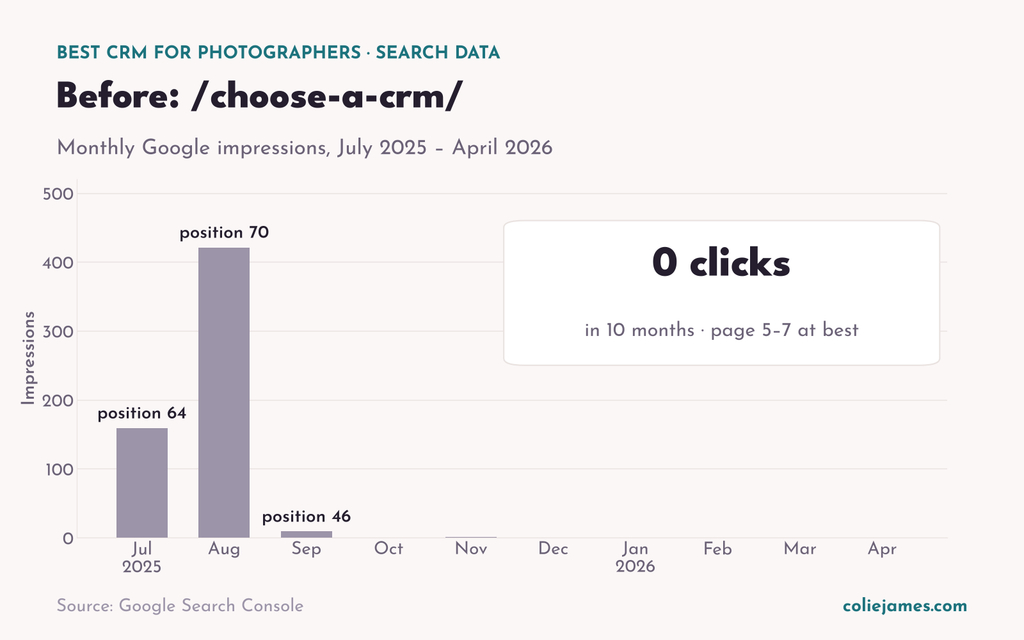
Google agreed. From July 2025 through April 2026 the post showed up in search 590 times, mostly around position 64 to 70, which is page seven (aka nobody is scrolling that far 😂). It never got a single click, and Google Analytics shows zero visits from December through mid-May.
The Question That Started It
In May, in the middle of my SEO overhaul, I ran the post through Ivy the Optimizer, a custom GPT from Ivingo Creative that optimizes pages for SEO. I asked it what felt like a small question: should I put “HoneyBook vs Dubsado” in the title?
The answer changed the whole post. The bigger opportunity was “best CRM for photographers.” That’s the broader search, and it’s what people type when they’re deciding which CRM to buy. A title that just says “choose a CRM” is vague. A title like Best CRM for Photographers: HoneyBook vs Dubsado tells Google the audience, the topic and the comparison all at once.
And the posts I’d been studying, from other photographer educators, were all built around that exact phrase.
That’s when it clicked. My post was answering how do I choose? while the photographers I wanted were searching which one is best?, and those are two totally different people… one is still learning, and one is ready to buy.
What Ivy the Optimizer Told Me to Do
Ivy didn’t just answer the title question. It gave me a plan for the whole page.
Make it the main guide, not a two-tool comparison. Ivy laid out two options. If the post was mostly HoneyBook vs. Dubsado, title it that way. But since it covered more than two CRMs, the stronger move was to make it the main hub: URL /best-crm-for-photographers/, a title like Best CRM for Photographers: HoneyBook vs Dubsado & More, and separate comparison posts that link back to it.
Change who you’re talking to. It called out that I was moving the post from general, “here’s some information” content to content for someone actively comparing their options before they buy. That reader is closer to booking a call or buying a program, which is exactly who I want.
Then strengthen the page itself. Once I told it I’d changed the URL, title and meta description and set up the redirect, it gave me a checklist:
- Put “best CRM for photographers” in the H1, near the beginning
- Rewrite the H2s around real searches, like What is the best CRM for photographers?
- Add a quick answer near the top so Google and AI search can pull it
- Add a comparison table (it called this the biggest remaining opportunity)
- Add more firsthand experience, like “most photographers I work with struggle with…”
- Link related posts to this one and this one back out, so it becomes the hub
- Use variations like “photography CRM” instead of repeating one phrase over and over
What I didn’t take. Its example tables included CRMs I don’t recommend, like Studio Ninja, and a “HoneyBook for beginners, Dubsado for advanced” split that I don’t agree with AT ALL. I am now of the opinion that Dubsado vs HoneyBook barely matters. Pick one, love it, and actually use it. So I kept Ivy’s structure and my own opinions.
The Changes I Made, in Order
1. A new URL, with a redirect. I moved the post from /choose-a-crm/ to /best-crm-for-photographers/ and set up a 301 redirect. A 301 redirect tells Google (and anyone with the old link) that the page has permanently moved, so nobody lands on a dead page.
2. A new SEO title and meta description. The title became Best CRM for Photographers: Dubsado vs HoneyBook & Other Options. Now the title actually says who it’s for.
3. Headings rewritten for how photographers search. For example:
- “How to Choose a CRM: It’s NOT About the Price Tag!” became “How to Choose a CRM: Stop Letting Price Make the Decision for You”
- “Overall, I Recommend Dubsado or Honeybook for Photographers (+ Other Visual Artists!)” became “My Top CRM Picks for Photographers and Visual Artists”
4. Proof and connections. I added an FAQ section (with FAQ schema through Yoast), linked to related posts and client case studies, and rewrote my author bio so it says who I am and why I know this stuff.
Building out your own comparison content? Here’s how I think about HoneyBook vs. Dubsado for photographers.
What Happened the Next Day
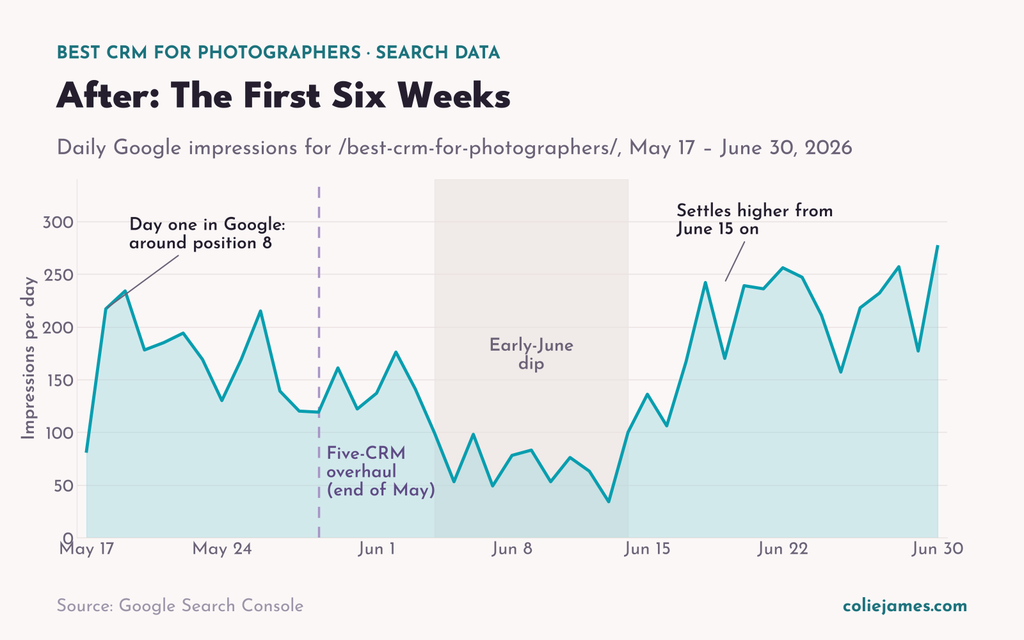
The new URL showed up in Google on May 17, and by May 18 it had more than 200 impressions a day at around position 8. That’s page one, y’all. After almost a year on page seven, it took ONE day 🤯
It wasn’t a straight line up, and I don’t want to pretend it was. In early June, impressions dipped to around 50 to 100 a day while Google figured out where the page belonged. Then, from June 15 on, it settled higher (around 200 to 270 a day) and it’s held there since.
Then I Went All In on the Content
The URL change is what got the post seen, but what I did next is why it stayed there.
By the end of May I’d rewritten the post to recommend exactly five CRMs: Dubsado, HoneyBook, 17hats, Sprout Studio and VSCO Workspace. I added a section on gallery and booking tools that market themselves as CRM alternatives. And I built the comparison charts right into the post: a five-CRM feature table, a table for teams and multiple brands, and a side-by-side Dubsado vs. HoneyBook table.
Those tables replaced my old comparison guide opt-in. Instead of asking people for an email address to see the comparison, the comparison is the post now. coliejames.com/compare redirects there.
The Results
| Before: /choose-a-crm/ (Jul 2025 to Apr 2026) | After: /best-crm-for-photographers/ (May 17 to Nov 23, 2026) | |
|---|---|---|
| Clicks from Google | 0 | 140 |
| Times it showed up in search | 590 | 34,159 |
| Average position | 64 to 70 (page seven) | about 7 (page one) |
| Website visits (Google Analytics) | 0 (Dec to mid-May) | 485 views from 314 visitors |
| Time spent per visitor | none | about 1 minute |
Source: Google Search Console and Google Analytics 4. Average position after is June to October.
About 45% of the people reading it now come from Google search. The rest find it some other way.
Want to see the post itself? Read Best CRM for Photographers: Dubsado vs HoneyBook & Other Options.
Should You Change Your Blog Post URL? What I’d Check First
Now, I’m not telling you to go change every URL on your site tonight (please don’t 😂). Here’s what I’d check before you touch yours.
Is the post getting clicks right now? If it is, protect it. My HoneyBook vs. Dubsado post ranks on page one, so I left its URL alone and built new content next to it. My CRM post had nothing to lose.
Does the title say who it’s for? Mine said “small business,” but the post was written for photographers. If your title could belong to anyone, Google has no reason to show it to your person.
Is it a “how to” post or a “which one” post? Someone learning searches differently than someone deciding. Write for the search you actually want to show up for, then make the URL, title and headings all match it.
Did you redirect the old URL? Always set up a 301 redirect, then update your own links that point to the old address. I use the Redirection settings in WordPress for this.
The Bigger Lesson
So before you write a brand new post on a topic you’ve already covered, go look at the one you already have. Mine just needed to be pointed at the right search, and then made strong enough to deserve it.
That’s the same thing I said in What I Learned Redoing My SEO: know what you have before you write anything new.
Full disclosure, I only pieced this story together months later with Search Console, Google Analytics and a couple of old AI chats [because past me did NOT write any of this down 🙃].
The Tool I Built So I Never Have to Dig Like This Again
That’s exactly why I built Content Flamingo. It holds my blog posts, emails and podcast episodes in one place, and now it pulls in my search data too. It shows me which posts are getting seen but not clicked, and which ones need a refresh.
So, do you want first dibs on Content Flamingo? JOIN the waitlist HERE and I’ll tell you the minute doors open.
FAQ: Changing a Blog Post URL for SEO
Will changing a blog post URL hurt my SEO? It can if the post is already ranking or you skip the redirect. With a 301 redirect, and on a post that isn’t getting clicks, there’s very little to lose. My post went from zero clicks to page one.
How long did it take Google to show the new URL? About a day. My new URL showed up in Google on May 17 and was at around position 8 by May 18. It dipped in early June, then settled higher from mid-June on.
Should I change the URL of a post that’s already ranking? Usually not. If it’s getting clicks, keep the URL and build new posts that link to it.
What is a 301 redirect? A 301 redirect permanently sends visitors and Google from an old URL to a new one, so old links still work.
Do I need to rewrite the post too, or just change the URL? I did both, and I’d do both again. The new URL, title and headings got the post seen. The rewrite and comparison tables are what made it worth staying on.


Signature Series


Your business works, but your backend is costing you.
A 4-Part Audio Series for service-based business owners who are ready to upgrade their “just fine” client experience, unlock higher pricing, increase referrals, and grow more sustainable revenue—without overworking behind the scenes.
Get the FREE 4-part audio training series
Systems That Sell


© 2022-2025 Colie James


