




I have over 300 podcast episodes and more than 100 blog posts on this site. Which means I’ve had to get really intentional about my internal linking strategy.
Ideas have never been my problem. Something pops up on Threads, a client asks a question I’ve heard four times that week, a potential client says something in a discovery call that I know ten other people are thinking — and suddenly I am hopping on the microphone to immediately create a piece of content around it. My content calendar is basically just a running list of things my audience is already telling me they need.
The problem is knowing whether I’ve already answered it.
Because most of the time? I have. Maybe not from this exact angle, maybe not with the client story I’d tell today, but the bones of it exist somewhere in my catalog. And if I just go create something new without checking, I end up with a second (or third) version of the same post floating around my site — not connected to anything, not building on what I already built.
That’s my specific content problem and maybe yours too?
Don’t get me wrong, sometimes a topic genuinely needs a refresh, like my position has gotten stronger, I’ve done new client work that changes how I’d say something, or the landscape has shifted enough that the old post needs updating. That’s worth doing. But the starting point has to be knowing what’s already there.
And once you know what’s there? The goal is to make sure it all connects. Long-form content brings in traffic, sure. But it also converts.
When someone is seriously considering working with you, they binge. They read four blog posts in an afternoon. They listen to six podcast episodes on a drive. They’re doing research, building trust, and deciding whether you’re the right fit. And they’re doing all of that in a pretty short window of time.
The question is: are you organizing your content so they’re consuming the RIGHT things during that window? The posts that answer their specific questions. The episodes that speak directly to where they are. The content that leads them naturally toward a decision — instead of dropping them into something unrelated and losing the momentum entirely.
I started noticing the pattern through my own team.
Kara, my blog writer, would come to me every quarter with topic suggestions for the content plan. And almost every time, I’d say some version of “oh, I’ve got a podcast episode on that.” [Sometimes three, if I’m being honest.]
So we needed a better way of knowing what I’d already creating and what was legitimately missing from my body of content.
The Content Idea That’s Driving How I Work Now
There will always be a new angle. A seasonally relevant hook, a fresh client story, something that happened last month that makes an old topic feel brand new. That’s real and worth chasing.
But here’s what I actually believe: the new angle is the intrigue. It’s the thing that gets someone to click. Your back catalog, the depth of what you’ve already created, is what does the heavy lifting once they’re in.
At the end of last year, I had marketing strategist Latesha Lynch on the Business-First Creatives podcast to talk about what she calls Inception Marketing, the idea that one piece of content, structured well and connected to everything around it, can do the work of fifty. She is very specific that this is NOT repurposing. (Repurposing implies you chop one thing into twelve smaller things and post them everywhere. Most people find that exhausting because it is. You’re just multiplying your workload.)
What she’s talking about is different. When a piece of content hits someone right — like really lands — they want more. They go looking. They start clicking around your site, reading old posts, going down a rabbit hole.
Your job is to make sure that rabbit hole exists and that there’s a clear path to follow.
The version I keep coming back to is simpler: know what you have, find the new angle, and make sure everything connects. That’s what sent me back through years of content this spring.
Why a Content Rabbit Hole Matters in the Land of AI
I used to really pride myself on the super low bounce rate on my photography website. People would come to my site and just click on all of the breadcrumbs I was leaving them.
And then somehow, when I went from a photography website to a systems website, I just lost my mind and forgot all of the things that made my photography website really good. And while I thought I created a lot of content as a photographer + photography educator, I create WAY more content now 🤣
So in this new AI landscape, we ALL need to do a couple of things really well.
Number one: answer the person’s question as quickly as possible so they stay.
The idea before was kind of: give them the information, take them down your blog post, and try to keep them on your website as long as possible. Give them a bunch of information, then lead them to the next thing, and the next, and the next.
Because with all of this information at your fingertips and AI Overviews and all of the like, you have to make it really fucking clear to someone in the first 3 to 5 seconds of landing on whatever page they’re on that you know the answer to their question, and that you can add more value.
Number two: link to what’s actually relevant.
Organizing your content this way, and making sure you’re linking to relevant content instead of sending people on a wild goose chase, is more important than ever. Do NOT link to 3-5 posts just because you can. Each link they click needs to add something to the conversation and make them interested enough to click again.
I’m Not Selling the How Anymore
Full disclosure, I feel like my business has changed a lot in the last 2 years and it took me a minute to get my content creation caught up.
I’m no longer selling the how. Most of my offers are about the support and the accountability to actually get it done. So right now I’m a lot more generous with the how, because if I tell you the 10 steps to do this thing, there are still reasons you’d hire me. You want me to HELP you actually do it, challenge accepted.
Number one, so we can customize those 10 steps and make sure they’re perfectly aligned with you and your business.
Then comes the support and the accountability. And in some cases, the skip-the-line fast pass: tools I’ve created, like my client journey map or my email writer, plus the accountability and support I give you the whole time we work together.
Which means I can put the good stuff out there, link it all together, and let people go as deep as they want.
What I Actually Did This Spring
I published 28 new blog posts in about three months, and updated at least that many old ones.
I went back into old posts and beefed them up with more relevant content, added deliberate internal links so a reader always knew where to go next, and resubmitted everything to Google Search Console.
Unglamorous? Yes. Worth it? Absolutely.
And it worked. Compared with the same months last year, my clicks from Google are up 42%, and my average position went from page three to page one. (I break down all the numbers in What I Learned Redoing My SEO.)
This really kicked into high gear in May when I accompanied my husband James on a business trip. He was in training all day. I was in the hotel with nothing but time and a laptop and absolutely zero excuses not to dig in.
That’s when I really started finding the connections — and the gaps. Not just linking posts to each other, but looking at what keywords and search phrases I wanted to rank on page one for and figuring out whether I had the content to back it up. Some topics had three posts that weren’t talking to each other. Others had nothing at all.
Then I did an SEO sprint with Brittany Herzberg, and it changed how I looked at everything I’d already written. I wrote up everything I learned in What I Learned Redoing My SEO.
Funny story: you’re reading this in November, but I actually wrote this post back in June. And then it got buried in a Claude chat and never got published. A post about losing track of your content… that I lost track of. I couldn’t make this up if I tried.
How I keep track of it all now
The thing that made this possible was having a content library I could actually navigate. I’d been tracking my content in Airtable for years — if you don’t have a system for knowing what you’ve created yet, that’s where to start. Last winter I moved that tracking into Notion. (I talked through that transition on the podcast, if you want the behind-the-scenes.)
And now I’ve created a brand new app, Content Flamingo, to manage it even more easily. It has replaced my old Airtable content hub and what I was trying to build in Notion. It not only organizes and links all my blog content, but includes my emails and podcasts as well. This is TRULY my content machine, so I can dig all the way into Inception Marketing and give my back catalog of content a new opportunity to shine.
But here’s the real reason I’ve been so motivated to get everything documented: if I’m the only person who knows what exists, no one else can do the linking for me.
I work with Kara and Haylee. Haylee only does podcasting, but she still needs to know where everything lives so she can link to the right posts and episodes. I want both of them to be able to open our content library and know exactly what we’ve already got. No asking me, no me explaining it, and no revising an idea because it’s basically something we already published eighteen months ago. They’re not in Content Flamingo yet, but that’s where this is headed.
The tool matters less than the fact that everyone who touches your content can look at what you’ve published in one place and start connecting dots. What I was looking for: topic clusters. Places where I had multiple pieces of content on the same subject that weren’t talking to each other. Places where an older, well-ranking post was sending people to a dead end. Places where a new post needed to earn its place by linking back into content that already existed.
You can do that in a spreadsheet y’all.
But to take it one step further, you are going to need a searchable database, an AI tool to do analyze the data for you, or an app that does both, like Content Flamingo. And now I have a better handle on what content I have, I can reference back to it on Threads, in podcast episodes, emails, or even other blog posts.
What a Real Content Rabbit Hole Looks Like
Here’s what that looked like in practice.
The Dubsado Workflows Series
Dubsado workflows are one of the topics I get asked about more than almost anything else. How do you set one up? What should be in it? Why isn’t mine working?
And that’s exactly why this series had to exist. Workflows are what people think is broken.
My hope is that someone is Googling something about their Dubsado workflows not working, or how to create one, or how to make the whole thing more efficient, and they land here.
The series gives them the quick win. It lets them know I can, in fact, help them create workflows that just work.
But it also steers them toward the real step one. Because the more of my content they read, the more they realize that before they can fix their workflows, they have to design a five-star client experience and map out their client journey.
This wasn’t my first series, by the way. Back in March 2025 I did a four-part Client Experience Series on the podcast, and part two was literally how to map your client experience. But this one was built around the thing people already think is broken, so it meets them right where they’re searching.
My highest-ranking piece of content on workflows was a templates post from my Systems Shop. Templates I no longer sell, by the way.
So I had a page ranking — getting traffic, showing up in search — that was sending people to an offer that didn’t exist anymore. If that makes you cringe a little, good. It made me cringe too.
Instead of just updating that one post, I built a 7-part series. Each post covers one phase of the Dubsado workflow — inquiry, booking, onboarding, delivery, offboarding, and the mistakes I see most — and stands alone well enough that someone can land on it from search and get real value. But every post also connects to the rest of the series, so if someone wants the full picture, it’s right there.
The cornerstone post at coliejames.com/dubsado-workflows became the anchor. Everything links back to it. And it links out to every post in the series.
Someone searching “Dubsado inquiry workflow” lands on one post. Three clicks later, they’ve read half the series. That’s the rabbit hole working.
And Google noticed. In the six months after I built the series, the cornerstone post went from 2 clicks to 23 and the mistakes post went from 1 to 20. That old templates post dropped from 121 clicks to 42, because the series started picking up those searches instead. Which is exactly what I wanted.
Follow one reader down the rabbit hole
Here’s what that actually looks like for one person, using links that are live on my site right now.
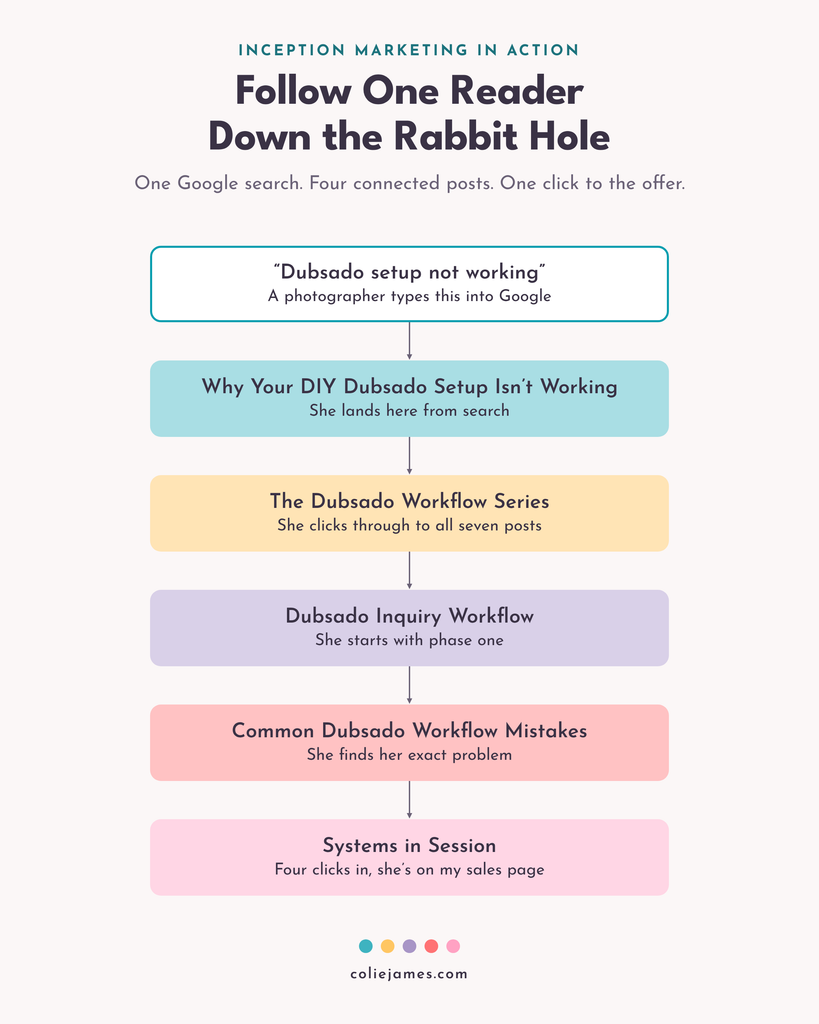
A photographer is frustrated with her Dubsado setup, so she types “Dubsado setup not working” into Google. She lands on Why Your DIY Dubsado Setup Isn’t Working.
That post links to the Dubsado Workflow Series, so she clicks through to see all seven posts. She starts at the beginning with the inquiry workflow, because that’s where her leads keep falling through the cracks.
Every post in the series has the series block, so she keeps going until she hits Common Dubsado Workflow Mistakes. And there it is: the exact thing breaking her setup.
At the bottom of that post is Systems in Session.
One search. Four connected posts. Four clicks from “why isn’t this working” to my sales page, and I never had to write a single new thing to make that path exist. I just had to connect it.
What’s actually inside that first post
That DIY post exists for a reason. My “how to set up Dubsado in three hours” post ranks in the top 10, but it was pulling in people who hadn’t tried yet. The positioning wasn’t the problem. Google was just showing that post instead of something else I had. So in May I wrote Why Your DIY Dubsado Setup Isn’t Working for the photographer who already tried, and something broke.
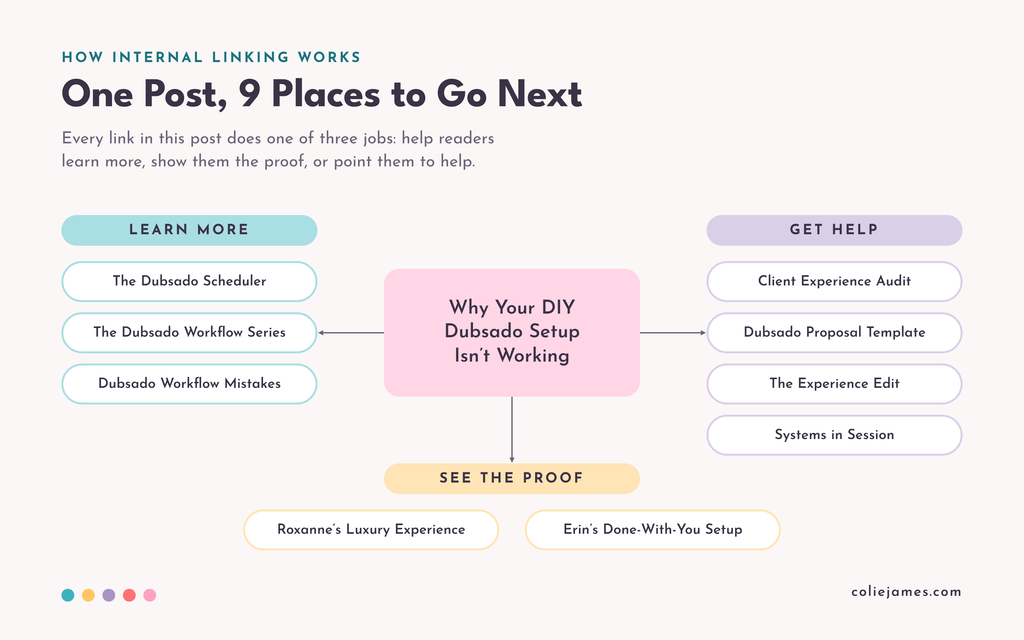
And I built it to send her somewhere. That one post links to nine other pages on my site, and every link does one of three jobs:
- Learn more: the Dubsado scheduler post, the Workflow Series, and the most common workflow mistakes
- See the proof: Roxanne’s luxury client experience and Erin’s done-with-you setup
- Get help: the Client Experience Audit, my Dubsado Proposal Template, The Experience Edit, and Systems in Session
If you take one thing from this post, make it this: every post you publish should answer three questions. Where do I learn more? Where’s the proof? Where do I get help?
The Client Experience Cornerstone + The 3Rs
Are you tired of hearing me talk about client experience yet? I feel like it’s ALL I talk about.
But I’m gonna keep talking about it, it’s what drives reviews, referrals, and repeat clients. Not your inbound marketing, not your social media, not your pricing structure. The experience is the thing. I’ve said this approximately one thousand times on the podcast y’all, and I finally wrote the post that says it fully: How to Create a 5-Star Photography Client Experience.
It covers the full arc, from inquiry to offboarding, and it’s where I send anyone who wants to understand my philosophy before they decide whether to work with me.
But inside that post live three series blocks.
The first is the 3Rs series, a cluster of posts about getting photography clients, creating a great experience, turning happy clients into sales, getting repeat clients, and asking for testimonials. Each of those posts build on each other and someone who lands on the 5-star experience post and wants to go deeper on referrals clicks into the 3Rs content. Someone who wants to understand rebooking clicks into that. The rabbit hole keeps going, and going, and going.
The second block is the Dubsado Workflow Series, because once someone understands what their client experience should look like, the next question is how do I actually build this in my CRM? That block answers it.
The third is my Client Experience block at the end of the post, for anyone who wants to keep going on the experience itself: mistakes you might not know you’re making, client emails, and client experience mapping.
One reader. Multiple entry points. A clear path forward at every stage.
Reviews, Referrals & Repeat Clients
Everything you need to get clients, wow them, and keep them coming back.
How to Get Photography Clients Build a photography business from scratch — even if you don’t know anyone. 5-Star Client Experience Deliver an experience worth talking about — from inquiry to offboarding. Turn Happy Clients Into Sales The 3Rs — rave reviews, referrals, and rebookings — as a complete business strategy. How to Get Repeat Clients Rebooking starts the moment you deliver the gallery — not when you remember to follow up. How to Ask for a Testimonial Get better reviews without it feeling awkward or transactional.The Photographer-Specific Opportunity Most People Are Missing
If you’re a photographer who blogs your sessions, and you should be, for a lot of reasons, there’s a rabbit hole sitting right in front of you that most people never build.
A potential client searching for a specific location might land on one session blog and not quite see themselves in it. Wrong season. Wrong family size. Different vibe than what they’re picturing. And they leave.
But if that post links to two or three other sessions from the same location? Now they’re going deeper. They’re scrolling through different families, different light, different setups — all in the spot they’re already considering. One of those is going to land. And the combination of all of them — the proof that you know that location cold, that you can work it in October and again in April — that’s what moves someone from “maybe” to “I need to reach out.”
Most photographer blogs have years of location-specific sessions scattered across their site. They’re just not connected to each other. This is one of the fastest rabbit holes you can build because the content already exists. You just need to link it.
How to Start Your Internal Linking Strategy (Even Without 300 Episodes)
You don’t need a massive library for this to work. Most service providers have more content than they realize: blog posts, podcast guest appearances, YouTube videos, even really good emails you sent that nobody saw because they landed at 7am on a Tuesday.
(That last one stings a little. I know.)
Start here: make a list of everything you’ve already created and what topic it covers. A Google Doc is fine. Notion works. Airtable works. Post-it notes technically work, though I will not personally endorse that. (Or, if you’re me, you build an entire app for it.)
Then identify your two or three main content topics, you know, the things you come back to again and again. For me it’s CRM setup, client experience, and content strategy. Everything I’ve created falls into one of those buckets.
Then ask one question about each piece: where should someone go next?
Not “what should I create next.” Where should someone go from this post if they want more?
Add that link. Do it for your five most important pieces first. Five connected posts beat fifty disconnected ones every time — and the work is a lot faster than starting from scratch.
This Is the Work Nobody Posts About
Nobody’s on Threads talking about the Saturday afternoon they spent going back through old blog posts and adding internal links. It’s not a launch. It’s not a new offer. It doesn’t make a great caption.
But it’s some of the most valuable content work you can do. It turns a pile of individual posts into a library people can actually get lost in.
You’ve already done the work of creating. Now make it work together.
And this is exactly why my Threads strategy looks the way it does.
When I post a hook on Threads, I want to know immediately what blog post or podcast episode I can point you toward to go deeper. That only works if I know what exists.
When someone asks a question on Threads that I have a resource to answer, I need that link handy — not buried somewhere I have to dig for it. The catalog has to be organized enough that I can pull from it in real time.
And sometimes the content I’m sharing isn’t even mine. It’s the people who have guested on my podcast. You’re looking for an offer strategist? I want to be able to recommend the people I love AND drop the link to the conversation we had together. My guest gets a potential referral. I get a possible download or new subscriber. Everyone wins.
That’s the whole game. Build the catalog. Connect the dots. Know what you have well enough to use it — on the fly, in the DMs, in a Threads thread at 9pm on a Wednesday.
The content is already there. Go connect it. That’s it.
Want the tool I use to keep track of it all?
Content Flamingo is the app I built to organize my blog posts, podcast episodes, and emails in one place, so I always know what I’ve already created and where it should link. I’m opening it up to a small group first.
Join the Content Flamingo waitlist → routineflamingo.com/content


Signature Series


Your business works, but your backend is costing you.
A 4-Part Audio Series for service-based business owners who are ready to upgrade their “just fine” client experience, unlock higher pricing, increase referrals, and grow more sustainable revenue—without overworking behind the scenes.
Get the FREE 4-part audio training series
Systems That Sell


© 2022-2025 Colie James


